
Sometime in projects an elevation needs to have the grid lines above the building.
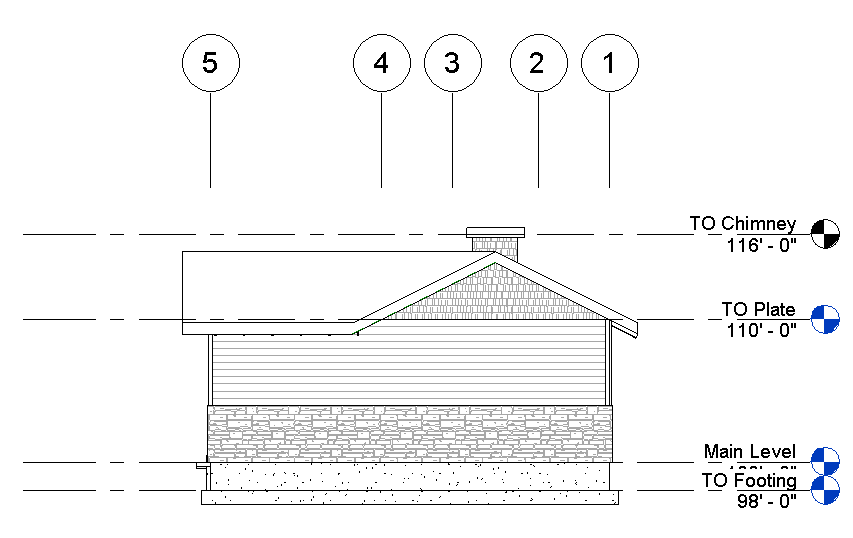
In order to accomplish this the 2D extents of the grid lines need to move not the 3D extents, because if the 3D extents are moved then the grid lines disappear in the plan views. There isn’t any need to click on each grid and hit the 3D grip to convert it to 2D. Simply enable the crop region, move the crop region so that it crosses over the grid lines. This will automatically convert the grid extents to 2D. Then drag the view specific grip (solid dot) on one of the grids, and all of them will move. Then propagate extents to the other views. If they need to go back to 3D then Right Click on each grid and select “Reset to 3D Extents”.
This is also true for Levels.
You’re welcome. I guess that is what the mouse pad was for?
Oh I guess I should have mentioned the fact that you finding this little gem made me realize it would be a good post. I just thought it was something everyone new 🙂
Good post! You can also set the grid to maintain a set length in its type properties/grid lines in section/elevation.
Troy, I must be blind because I haven’t been able to nor have I seen this property for grid lines.
ciao! thanks a lot.
It’s a great tip!
The only problem I encounter is that if you modify one grid line for any reason, the association with the crop region is lost. Do you know if there is any way to restore it?
Thanks again!
If you select the disassociated grid and Right Click there is an option to “Reset to Crop”. This will allow it to move with the crop region as normal.